
Browser and WebGL compatibility
Which browsers and devices run Orbis3D, what WebGL 2 is, how Orbis3D was tested, and what to do when 3D graphics are not available.
You will learn
- The browser features Orbis3D needs.
- Which browsers were tested.
- How to fix "WebGL 2 is not available".
Prerequisites
What Orbis3D needs
| Feature | Used for |
|---|---|
| WebGL 2 | Drawing the 3D terrain on the graphics processor |
| Module Web Workers | Reading and analysing rasters in the background |
| IndexedDB | Projects saved in the browser |
Blob and stream APIs, DecompressionStream |
Reading files; .hgt.gz tiles |
| Service workers (optional) | Offline use |
All current versions of Chrome, Edge, Firefox and Safari provide these features on desktop computers, and recent versions do on tablets and phones.
How Orbis3D was tested
Orbis3D 0.1.0 was tested automatically in Chromium (the engine of Chrome and Edge), in a headless browser with software rendering: opening every supported format, all analyses, all exports and project saving. Firefox and Safari were not part of the automated tests for this release. They support the same standard features, but if you meet a problem in them, please report it.
When WebGL 2 is not available
If the viewport says WebGL 2 is not available:
- Update your browser.
- Turn on hardware acceleration: in Chrome and Edge, Settings ▸ System ▸ Use graphics acceleration when available; in Firefox, Settings ▸ General ▸ Performance.
- Update your graphics driver. Browsers block some old drivers.
- Check
chrome://gpu(Chrome, Edge) orabout:support(Firefox) for the WebGL status. - Remote desktops and virtual machines often have no GPU; try on the computer itself.
Phones and tablets
Orbis3D adapts to small screens: the side panels become drawers and the menu bar becomes a single Menu button.
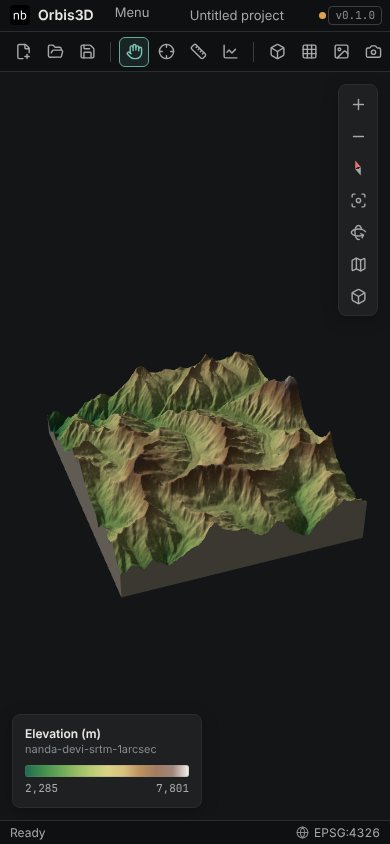
Phones have less memory and graphics power. Orbis3D starts them with 1 million cells per layer and a 250,000-vertex mesh; keep large rasters for a computer.
Graphics context lost
If the browser resets the graphics processor (often under memory pressure), Orbis3D shows a message and redraws when the browser restores the context. If it does not come back, reload the page and lower the mesh detail in Settings. Save your project first.
Common mistakes
- Using a remote desktop. Without a GPU, WebGL may be missing or very slow.
- Battery saver modes. Some laptops switch to a weaker graphics processor on battery; plug in for big terrains.